-
Written By Robert Scott
-
Updated on April 17th, 2026
Fix MySQL Error 1712: Step-by-Step Guide to Resolve It
Alice Query:
“MySQL Error 1712 keeps showing up, and it’s affecting my work. The error talks about a damaged PRIMARY index, which I’m not too familiar with. I don’t want to risk losing my files. Any simple way to fix it?”
MySQL Error 1712 usually appears when there is an issue with a table index or the storage engine. In fact, one common error message is “Index PRIMARY is corrupted”. When this happens, queries may stop working properly. It can also slow down database performance or cause unexpected errors while accessing data. In this blog, we’ll cover the possible methods to fix MySQL Error 1712 and use the DatabaseFileRecovery MySQL Database Recovery Tool.
Download Now Purchase Now
What Does MySQL Error 1712 Mean?
MySQL Error 1712 is a database error that usually means a table or its index is corrupted. In simple terms, MySQL can’t read or use the table properly because something in its structure is broken, often the PRIMARY index.
What it means:
- The table is damaged or not consistent
- MySQL is unable to access the data correctly
- Queries may fail or show errors while running
What Causes to Resolve Error 1712 in MySQL?
|
Cause |
Description |
|
Corrupted database files or indexes |
The table files or indexes get damaged and cannot be read properly |
|
Unexpected server shutdown or crash |
The database stops suddenly, which can break the table structure |
|
Hardware or disk issues |
Problems with storage devices can lead to data corruption |
|
Problems during table updates or writes |
Errors while saving data can cause inconsistency in tables |
|
InnoDB engine corruption |
Issues in the storage engine can damage table data and indexes |
Manual Methods to Fix MySQL Error 1712
Manual methods are just the basic things you try yourself. Basically, Simple checks. A bit of troubleshooting. They help you understand what’s actually going wrong. Sometimes the issue isn’t that big. So, with MySQL Error 1712, these steps can work if the damage is minor. Like a small issue with a table or index. Nothing too serious.
Fix 01: Check and Repair the Table
You can try repairing the affected table using MySQL commands to resolve MySQL Error 1712.
- Open MySQL command line or phpMyAdmin
- Select the affected database
- Run this command:
REPAIR TABLE table_name; - Then, check if the error is resolved
Fix 02: Use the CHECK TABLE Command
This helps you identify corruption first.
- Open MySQL interface
- Run:
CHECK TABLE table_name; - Review the output for errors
- Then repair the table if needed
Fix 03: Restart MySQL Server
Sometimes a simple restart can fix temporary issues.
- Firstly, stop the MySQL service
- Then, wait a few seconds
- Now, start the service again
- Lastly, recheck the database
Fix 04: Restore from Backup
If the table is badly corrupted, restoring from a backup is the safest option.
Steps:
- Locate your latest database backup
- Restore the database
- Verify data integrity after restore
Fix 05: Check Disk or Storage Issues
Since corruption can come from hardware problems:
- Check disk health
- Ensure enough storage space
- Run system diagnostics if needed
Expert Solution to Fix MySQL Error 1712
If nothing seems to work and you’re still stuck with MySQL Error 1712, it might be time to try a recovery tool. The DatabaseFileRecovery MySQL Recovery Tool can help when tables or indexes are badly corrupted, especially in cases like a broken PRIMARY index. It scans the damaged database files and pulls out usable data. This includes tables, indexes, views, triggers, and even stored procedures. You don’t need to be an expert to use it. The steps are straightforward, and the process is guided, so you’re not guessing what to do next.
Once the recovery is done, you can either restore everything into a new MySQL database or save it as SQL scripts. That makes it easier to review things before putting the data back into use.
Professional steps to Fix Index PRIMARY is corrupted:
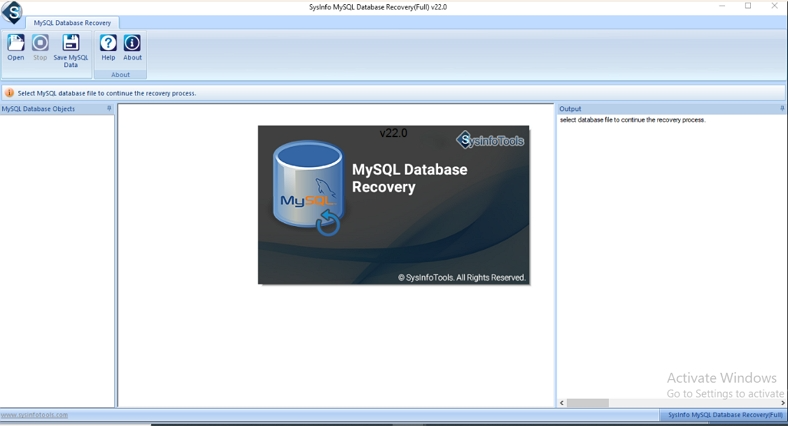
- Firstly, install and download the MySQL Database Recovery Tool as an administrator.
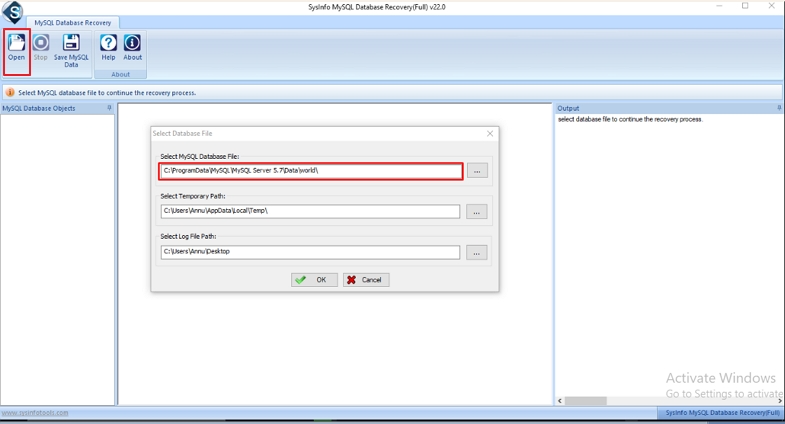
- After that, click Open to browse and specify the MySQL file path for recovery.
- Afterwards, if your folder doesn’t have the ibdata1 file and you need to include it, simply click Yes.

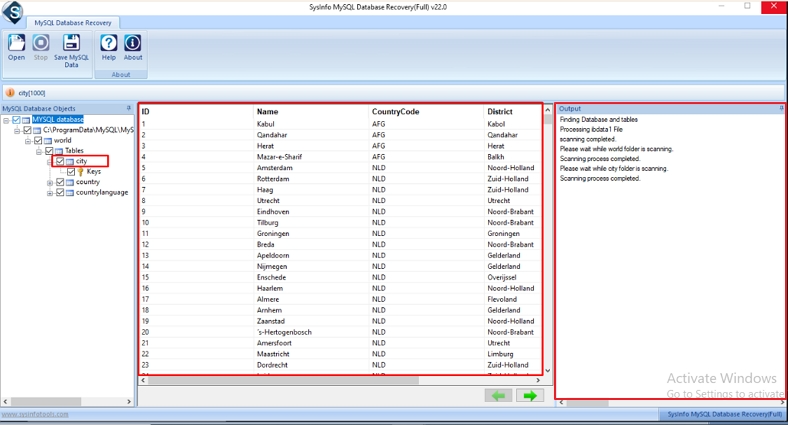
- Then, preview and select your added MySQL Ibdata file content to recover.
- Now, click on Save MySQL Data at the top, then choose either Save as Database or Save as Script.
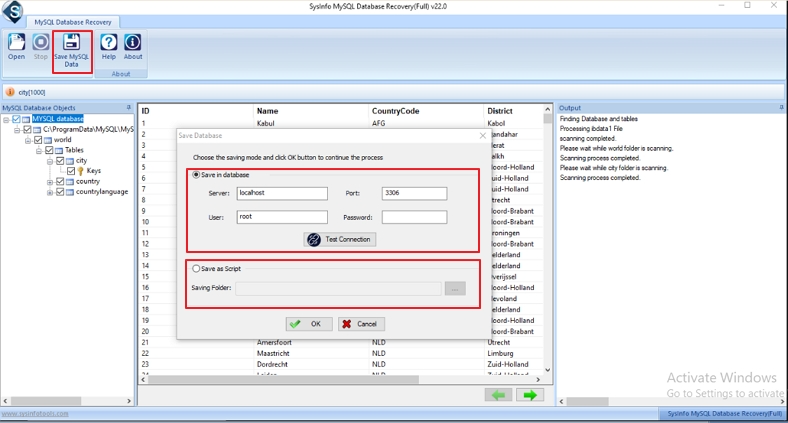
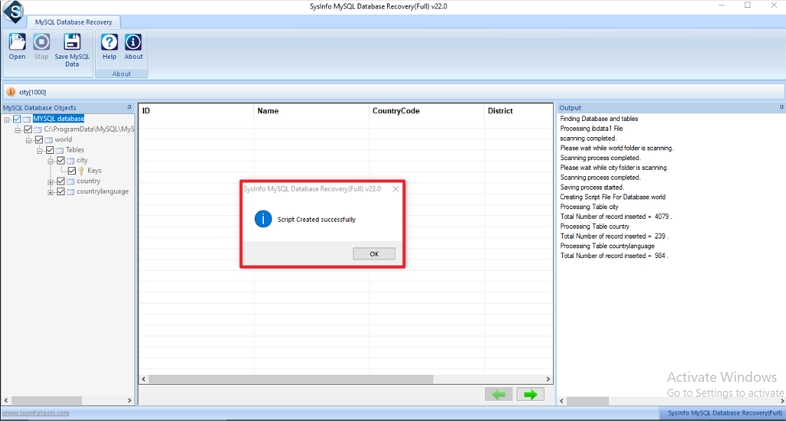
- Lastly, enter the required details and click OK to start the recovery process. Once it finishes, click OK again.
Final Thought
MySQL Error 1712 usually indicates an issue with a table, often the PRIMARY index. It sounds serious, but you can still fix it with small fixes. Start simple. Restart MySQL. Try basic repair steps to fix MySQL Error 1712. Sometimes these fixes solve the issue. And if nothing works, a tool like the DatabaseFileRecovery MySQL Recovery Tool can help. It can pull data from corrupted tables when other methods fail.
Frequently Asked Questions(FAQS):
Q1. How can I fix MySQL Error 1712 quickly?
Ans. You can try basic steps like checking the table, repairing it, or restarting the MySQL service. If the issue is serious, using the DatabaseFileRecovery MySQL Database Recovery Tool can help fix corrupted tables more quickly.
Q2. What does “Index PRIMARY is corrupted” mean in MySQL?
Ans. It means the main index of a table is damaged, so MySQL cannot read the data properly. In such cases, the DatabaseFileRecovery MySQL Database Recovery Tool can be used to repair and recover the corrupted index safely.
Q3. How long does it take to resolve MySQL Error 1712?
Ans. It depends on the level of corruption and the size of the database. Simple issues may take a few minutes, but complex cases may take longer. A tool like DatabaseFileRecovery MySQL Database Recovery Tool can help speed up the recovery process.
Q4. Does fixing MySQL Error 1712 affect data integrity?
Ans. If handled carefully, data integrity can be preserved. However, manual fixes may sometimes risk data loss. Using a reliable option like the DatabaseFileRecovery MySQL Database Recovery Tool helps maintain data safety during the recovery process.
About The Author:

With more than five years of experience in email migration, Data Recovery, Email Backup, and File Management, I combine my years of experience with a strong interest in new technology. My professional journey is fueled by a genuine passion for navigating and mastering the latest advancements in these fields, ensuring that I stay ahead of the curve and bring innovative solutions to the table.
Related Post