-
Written By Shivam Rathore
-
Updated on June 18th, 2026
Fix MySQL Error 1033: Complete Guide to Repair Corrupted Tables
MySQL error 1033 occurs when your database engine cannot read information from a table file correctly. This is faced by users while accessing MyISAM tables within an enterprise environment. Such corruption can disrupt daily operations and risk loss of critical business data. Understanding the root cause helps administrators apply the right fix without further damage. This blog explains how to fix MySQL error 1033 effectively and restore database accessibility. We will describe the manual procedure and the professional DatabaseFileRecovery MySQL Database Recovery Tool for complete resolution.
Download Now Purchase Now
What Causes MySQL Table Corruption?
- Abrupt server shutdowns during active read or write operations.
- Hardware failures affecting disk storage or memory components.
- Power outages occur while database files remain open.
- Improper file transfers between different systems or platforms.
- Mismatched MySQL versions are reading incompatible table file formats.
- Operating system crashes are affecting the database file integrity.
- Forced termination of MySQL processes without proper closure.
- Insufficient disk space is causing incomplete write operations.
- Manual modification of table files outside MySQL operations.
MySQL Error 1033 Repair Methods Comparison
|
Method |
Applicable Engine |
Difficulty Level |
Requires Backup |
Risk Level |
|
REPAIR TABLE USE_FRM |
MyISAM |
Easy |
No |
Low |
|
Drop and Recreate Table |
MyISAM |
Advanced |
Yes |
Medium |
|
Correct Configuration File |
InnoDB |
Intermediate |
No |
Medium |
|
Restore from Backup |
MyISAM & InnoDB |
Intermediate |
Yes |
Low |
|
MySQL Database Recovery Tool |
MyISAM & InnoDB |
Easy |
No |
Low |
Manual Methods to Fix MySQL Error 1033
Before applying any fix, identify whether the affected table uses the MyISAM or InnoDB storage engine. This step is necessary since each repair approach is engine-specific. Run the following command to check the storage engine of a table:
|
SHOW TABLE STATUS WHERE Name = ‘table_name’; |
Method 1: Repair MySQL Table Error 1033 Using REPAIR TABLE
This method applies to MyISAM tables with damaged index files. Run the following command to rebuild the index using the existing table definition file:
|
REPAIR TABLE table_name USE_FRM; |
Check the Msg_text column in the result. A status of OK confirms successful repair, while an error indicates further corruption requiring the next method.
Method 2: Drop and Recreate the Table
This approach works for MyISAM tables when internal mapping between the definition and data files breaks. First, capture the existing table structure using:
|
SHOW CREATE TABLE table_name; |
After noting the structure, stop the MySQL server and back up the table’s FRM, MYD, and MYI files. Drop the table, restart the server, and recreate it using the captured structure with a CREATE TABLE statement. Stop the server once again, copy the backed up MYD and MYI files into the data directory, then restart MySQL.
Method 3: Correct the Configuration File
For InnoDB tables, this error often results from a mismatch between the configured tablespace size and the actual ibdata1 file size on disk. Stop the MySQL server and open the my.cnf or my.ini file. Verify the innodb_data_file_path setting reflects the correct file size, for example:
|
innodb_data_file_path=ibdata1:4G;ibdata2:50M:autoextend |
Save the correction and restart the server to apply the updated tablespace mapping.
Method 4: Restore from Backup
When table files are too damaged for direct repair, restoring from a valid backup remains the most dependable option. Connect to the MySQL server, then drop and recreate the database to fix MySQL table file error 1033:
|
DROP DATABASE database_name; |
|
CREATE DATABASE database_name; |
Restore the database using a previously created dump file:
|
mysql -u root -p database_name < dumpfile.sql |
Verify the restoration by checking the available tables:
|
SHOW TABLES; |
These manual methods work well in many situations, though they require technical precision and engine-specific handling. When manual repair becomes unreliable or backups remain unavailable, a professional recovery tool offers a more dependable alternative for complete data restoration.
Organization-Wide Solution to Fix MySQL error 1033
DatabaseFileRecovery MySQL Database Recovery Tool offers a dependable solution for fixing corrupted databases. This tool repairs damaged objects, including tables, keys, views, and triggers. It supports both MyISAM and InnoDB storage engines for complete recovery. A built in preview feature allows users to inspect recoverable data before saving. The software supports all MySQL versions and runs smoothly on Windows systems. Its interactive interface allows even novice users to perform recovery without technical expertise.
Steps to Recover MySQL Database Error 1033
- Download the MySQL Database Recovery Tool.
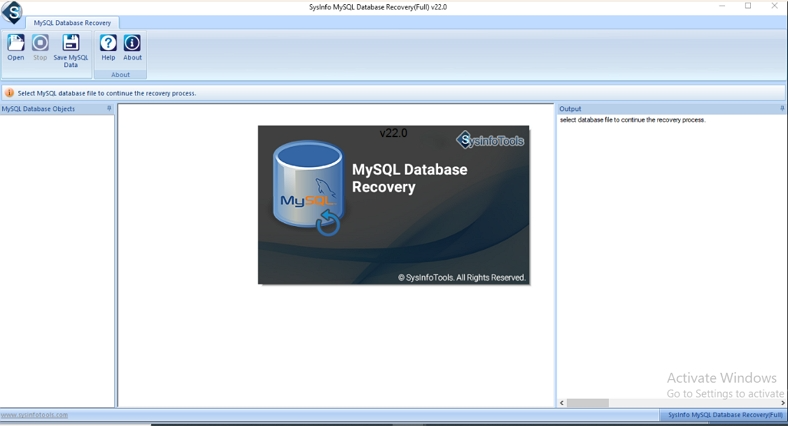
- Then, click Open and browse the MySQL file path.
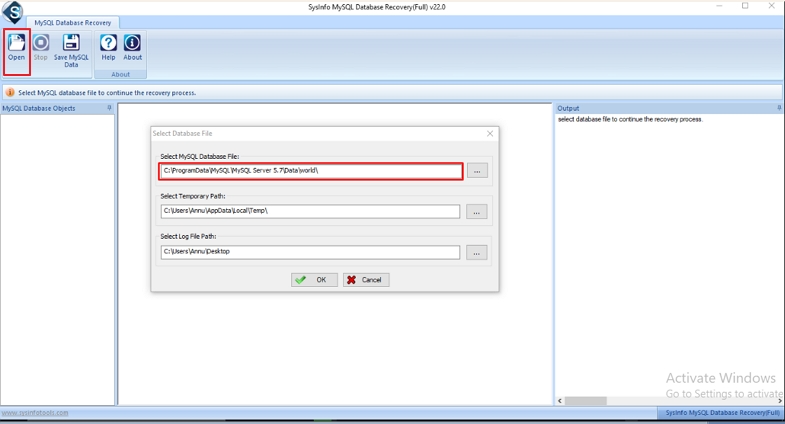
- Now, if you want to add the Ibdata1 file, click Yes.

- After that, preview the added file and select it to recover.
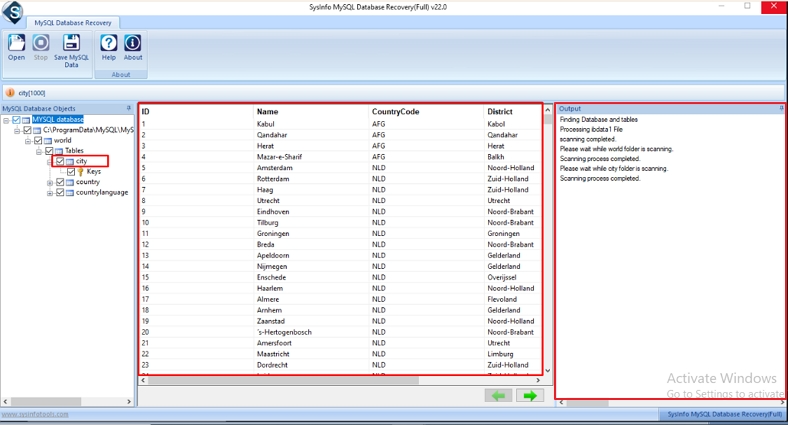
- Thereafter, click the Save MySQL Data and choose either the Save as Database or Save as Script option.
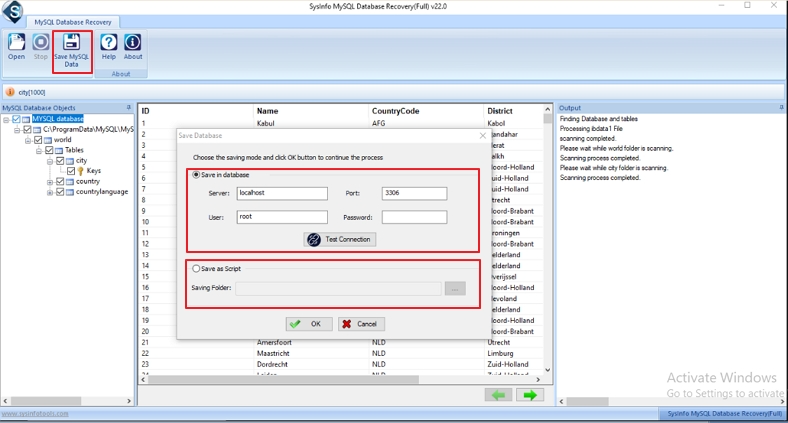
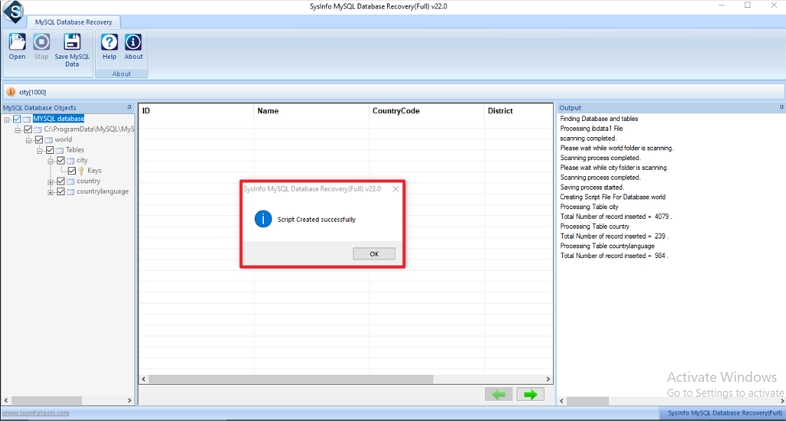
- Finally, enter the details and click Ok.
Conclusion
MySQL error 1033 occurs when the database engine fails to read the table, but the manual methods can resolve many cases. However, severe corruption often requires a more reliable solution for complete recovery. The DatabaseFileRecovery MySQL Database Recovery Tool simplifies this process by repairing MyISAM and InnoDB tables efficiently. It restores tables, keys, and other database objects without requiring advanced technical knowledge. Choosing the right approach helps administrators fix MySQL error 1033 accurately and prevent further data loss.
Frequently Asked Questions(FAQS):
Q1. Why is MySQL showing error 1033 after a server crash?
Ans: MySQL error 1033 commonly appears after a server crash because database files may become corrupted during interrupted read or write operations. The issue can affect both MyISAM and InnoDB tables, making them inaccessible until repaired or recovered.
Q2. How to repair a corrupt .frm file in MySQL?
Ans: DatabaseFileRecovery MySQL Database Recovery Tool can recover data from corrupted MySQL database files, including damaged table structures. It scans the affected database, rebuilds recoverable objects, and restores tables, keys, views, and triggers while maintaining data integrity.
Q3. How to use innodb_force_recovery to fix MySQL error 1033?
Ans: To use innodb_force_recovery, add the parameter in the MySQL configuration file (my.cnf or my.ini) and restart the MySQL server. This allows InnoDB to start in a recovery mode so you can access and back up data before performing further repairs. The recovery level should be increased gradually and used only when necessary.
Q4. What is the difference between MySQL error 1033 and error 1005?
Ans: MySQL error 1033 occurs when the database engine cannot correctly read a table due to corruption or file-related issues. Error 1005, on the other hand, generally occurs when MySQL cannot create a table because of configuration problems, storage engine conflicts, or foreign key constraints.
Q5. Best way to prevent MySQL error 1033 in production databases?
Ans: Regular database backups, proper server shutdown procedures, sufficient disk space monitoring, hardware maintenance, and avoiding direct modification of database files can help prevent MySQL error 1033. Additionally, using the DatabaseFileRecovery MySQL Database Recovery Tool can help recover critical data quickly if corruption occurs despite preventive measures.
About The Author:

Meet Shivam, an experienced SEO executive and content strategist. He combines creativity with strategy to craft engaging content that connects with audiences and supports brand goals. With strong expertise in digital marketing and content planning, Shivam helps businesses thrive online.
Related Post