-
Written By Shivam Rathore
-
Updated on April 17th, 2026
Step-by-Step Guide to Fix MS SQL Server Error 825
User Query:
“SQL Server keeps showing this Error 825, and I’m not really sure why. I looked up a few fixes, tried some basic stuff, but nothing changed. I’m a bit worried about touching anything important and messing up the data. Is there a simple and safe way to handle this without making things worse?”
It usually shows up while working with Microsoft SQL Server when Error 825 starts appearing in the logs. At first, everything may seem normal, since SQL Server retries the operation and continues running. In most cases, it points to problems like disk issues, I/O delays, faulty hardware, or even unstable storage connections. Sometimes it can also be linked to driver or firmware problems. In this blog, we’ll cover the possible solution to fix MS SQL Server Error 825 and use the DatabaseFileRecovery MS SQL Database Recovery Tool.
Download Now Purchase Now
What is SQL Server Error 825?
SQL Server Error 825 usually shows up when there’s a small issue while reading data from the disk. The system retries, and the read eventually works. So at first, it may not look like a big problem.
Key Points
- It’s more of a warning, not a complete failure.
- Usually points to some issue with the disk or storage.
- You’ll mostly find it in the logs, not on the screen.
- If you ignore it, it can turn into serious database problems later.
Common Causes of SQL Server Error 825
|
Causes |
Possible Reasons |
|
Disk or Storage Issues |
Failing hard drives, bad sectors, and RAID controller problems |
|
I/O Subsystem Problems |
Faulty cables or connections, SAN or storage latency |
|
Corrupted Database Pages |
Data pages are becoming unreadable |
|
System Crashes / Improper Shutdown |
Sudden power failure, forced shutdown of Microsoft SQL Server |
When You Should Start to Resolve SQL Error 825
- You keep seeing the same 825 warning again and again in the logs.
- The database feels slower than usual.
- Queries sometimes fail without a clear reason.
- Things take longer when reading or saving data.
- There are random delays even when the system isn’t busy.
- Performance feels inconsistent from time to time.
How to Troubleshoot SQL Server Error 825?
Let’s look at a few simple ways to troubleshoot this issue. You can start with the manual steps first. They often help in many cases. But if the problem still continues, you can also go for an easier automated option.
01: Manual Method to Fix MS SQL Server Error 825
Before jumping into the automated solution, start with a few basic manual checks for MS SQL Server Error 825. These small steps can help you catch the problem early and avoid bigger issues later on.
Fix 01: Run DBCC CHECKDB
This checks your database for corruption:
|
DBCC CHECKDB (‘YourDatabaseName’) |
If corruption is found, repair it immediately.
Fix 02: Replace Faulty Hardware
If disk issues are confirmed:
- Replace failing drives.
- Fix the RAID configuration.
- Upgrade storage if needed.
Fix 03: Move Database to Healthy Storage
If your current disk is unstable, move your database files to a reliable storage system.
Fix 04: Apply Latest Updates
Make sure SQL Server and your system drivers are updated.
Fix 05: Improve Backup Strategy
Always keep:
- Regular full backups.
- Differential backups.
- Transaction log backups.
02: Expert Solution to Fix MS SQL Server Error 825
If SQL Server Error 825 isn’t getting fixed with basic manual fixes, you might need another approach. This error often points to trouble in the database files or the storage itself. SQL Server depends on healthy files to run smoothly. If those files are damaged, simple fixes may not help much. In that case, a tool like DatabaseFileRecovery SQL Recovery Tool can step in. It can repair the files, recover your data, and help bring the database back without starting everything from scratch.
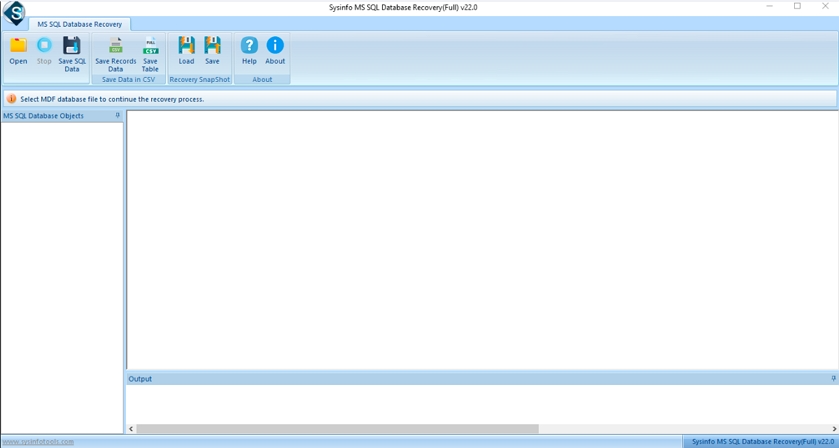
Quick Steps to Fix SQL 825 Error:
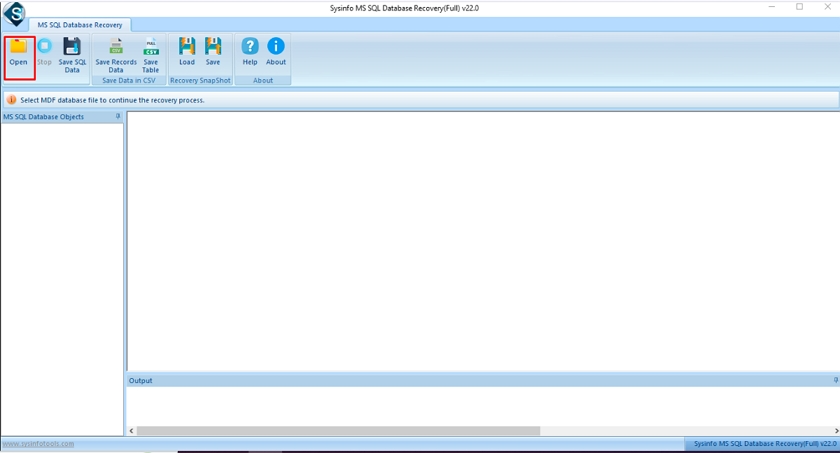
- First, install and launch the SQL Recovery Tool on your PC.
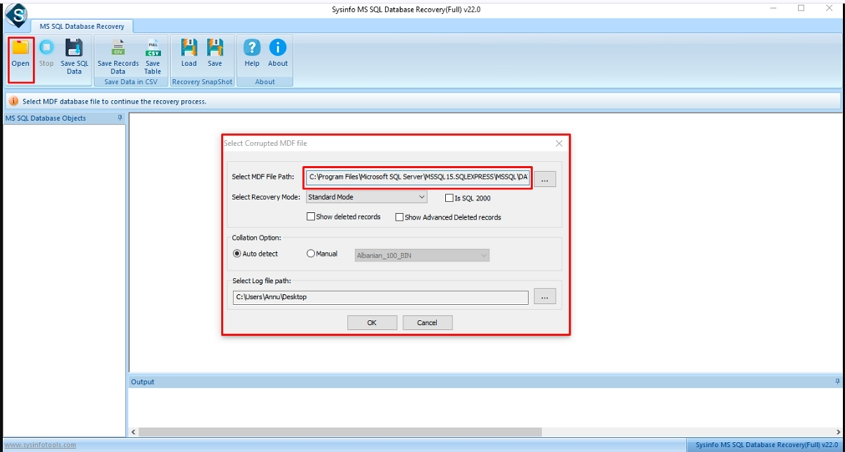
- After that, press Open and select the corrupt MDF file.
- Afterwards, check the path of the added MDF file.
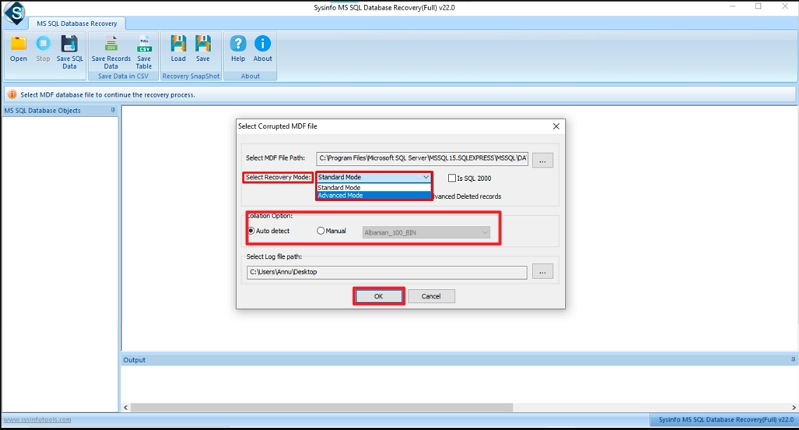
- Further, choose Recovery Mode as Standard/Advanced and select the Collation option. Hit OK.
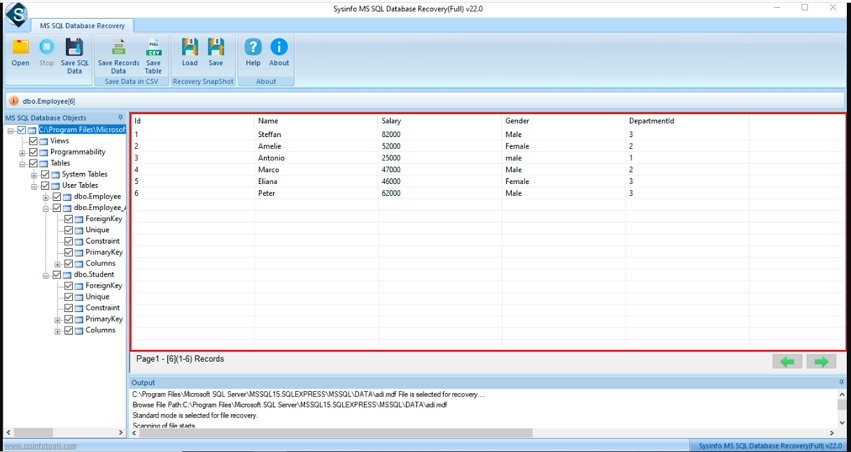
- Thereafter, preview files or folders and select the database object.
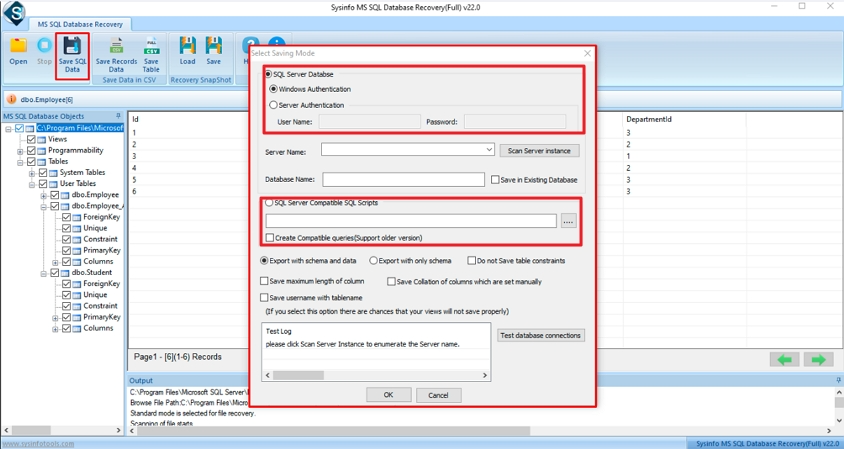
- Now, select SQL Server or SQL Server Compatible Scripts. Click OK.
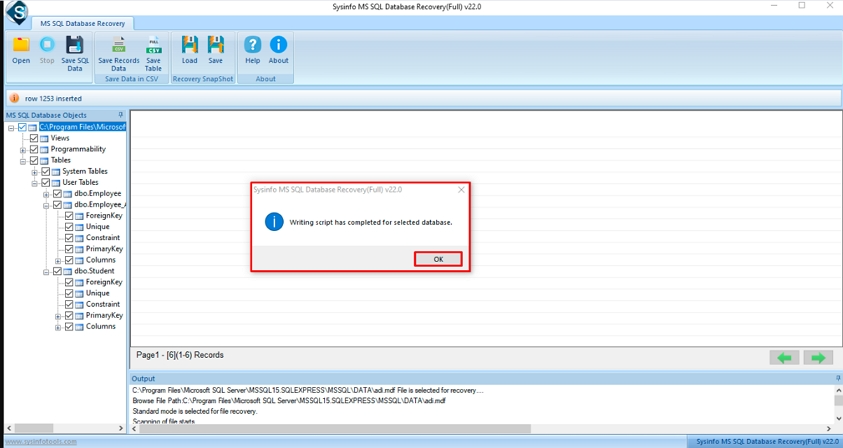
- At the end, a pop-up will appear on your screen, and then click on the OK button.
Time to Wrap Up
To conclude, with the help of this, we tried to tell the ways to deal with error 825. The steps shared above can help to fix MS SQL Server Error 825 in many cases. Simple steps like checking logs or running DBCC CHECKDB can sometimes help. But if the issue is serious and the files are affected, those steps may not work. In that case, using the DatabaseFileRecovery SQL Database Recovery tool can help you get your data back and make things work again.
Frequently Asked Questions(FAQS):
Q1. What is MS SQL Server Error 825?
Ans. It’s a warning that shows up when SQL Server has trouble reading data from disk but succeeds after retrying. It doesn’t fail immediately, but it points to a possible hardware or storage issue.
Q2. What causes SQL Server Error 825?
Ans. This usually happens due to disk problems, bad sectors, faulty cables, storage delays, or issues in the I/O system. Sometimes, improper shutdowns can also lead to it.
Q3. Is SQL Server Error 825 a critical issue?
Ans. Yes, it can become serious if ignored. Even though it looks like a warning, it may lead to data corruption or disk failure over time.
Q4. How can I fix SQL Server Error 825?
Ans. You can start by checking logs, testing disk health, and running DBCC CHECKDB. Fix any hardware issues if found. If the database gets damaged, you can use the DatabaseFileRecovery MySQL Database Recovery Tool to recover your data easily.
Q5. How can I prevent SQL Server Error 825 in the future?
Ans. Keep your system and SQL Server updated, monitor disk health regularly, avoid sudden shutdowns, and always maintain proper backups to stay safe.
About The Author:

Meet Shivam, an experienced SEO executive and content strategist. He combines creativity with strategy to craft engaging content that connects with audiences and supports brand goals. With strong expertise in digital marketing and content planning, Shivam helps businesses thrive online.
Related Post