-
Written By Shivam Rathore
-
Updated on March 28th, 2026
Easy & Quick Methods to Fix MS Access Error 3048
“I am constantly getting Error 3048, cannot access the database in my MS Access. It started after a cumulative update in the application, and especially occurs with the execute command or when I try to close the db. Also, the lock file remains open, and ultimately, I need to reboot the system to delete and close it. I am unable to deal with this issue, so can anyone please help with a quick fix Microsoft Access Error 3048?”
-Jacus Carper, California Estate
Database errors don’t interrupt workflows; instead, they restrict access to the critical data. A similar frustrating issue is Access error 3048, which occurs when the database is inaccessible. Further, whether you are an individual or a professional working with reports, forms, macros, backend data, or anything else, this error can be a big problem. Therefore, this guide helps you to immediately fix MS Access Error 3048 with some freeways and a strategic Access Database Recovery Tool with no loss.
Download Now Purchase Now
| MS Access Error 3048-What Is It?
This error typically occurs with the following messages: |
What Causes Error Code 3048 in MS Access?
Understanding the common issues helps to resolve the error quickly to resume the critical business operations:
- Multiple databases and connections are opened at the same time
- Corruption in the MDB and ACCDB Access files
- Insufficient memory and resources in the system
- Invalid location of the file and long paths
- Issues with the permissions or network access
- Temporary conflicts with the Access database files
- Incompatible programs and update conflicts
How to Fix Access Database Error 3048?
There are two popular solutions to resolve this access error. These are:
- Manual Method: One with some basic and advanced free fixes to manage the error and resume operations.
- Professional Tool: It provides automation and helps fix all Access issues, including severe database file corruptions.
You can check out the stepwise process for the methods in detail below.
Manual Troubleshooting Fix MS Access Error 3048
Follow the different tricks explained below to resolve the error free:
1) Close Applications and DB
MS Access puts restrictions on how many databases and files you can open at once. To ensure everything is accessible easily, close all unnecessary Access databases. Shutdown any running applications in the background and restart MS Access.
2) Check Length of File Path
If your memory is exhausted, restart the system and then save your database with a shorter file path like C:\AccessDB\filename.accdb. Avoid any special characters in it to avoid error 3048.
3) Repair the Access DB
Simply open your MS Access and click on File. In Info, press, Compact and Repair Database to resolve the issue. Choose your database and hit Compact and the error 3048 at minor level is fixed.
4) Verify File Permissions
Right-click your database folder and go to its Properties. In the Security tab, verify that full permissions are granted.
5) Fix Temporary File Conflicts
When Access opens databases, it generates (.LDB / .LACCDB), i.e., temporary lock files. It must be deleted properly to avoid future access blocking issues. To do so, navigate to your db folder and locate the lock files and delete them.
These are some general free fixes, but they only optimize performance, remove some unused space, and fixes general level issues. For major problem, specialized solutions are the real need of enterprises.
Top-Notch Solution to Fix MS Access Error 3048
When the database is heavily corrupted, it fails and creates many more errors and problems. At such times, use the DatabaseFileRecovery Access Database Recovery Tool for instant fix with scalability and precision. It repairs severely damaged MDB/ACCDB files, maintains data integrity, and works even if MS Access is unable to open them. Additionally, it recovers all queries, forms, reports, macros, tables, etc. from the db and saves them securely locally with no database risks. Moreover, it has support for all MS Access DB and Windows OS with a Demo Version for preview and evaluation.
Steps to Resolve MS Access Runtime Error 3048
- Run the MS Access Recovery Tool, click Open, and add the DB file.
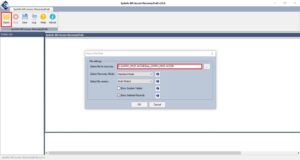
- Then, choose recover mode, file version, and other options, and click OK.
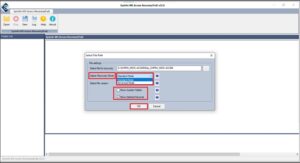
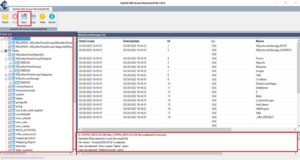
- Afterward, scan and preview the files in the Access DB and click Save.
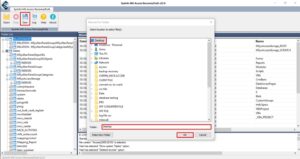
- Finally, pick a destination for recovery data and click Make New Folder. Tap OK.
Prevention Tips for Error Code 3048
- Do not launch more than one large database at any single given moment in time
- Compact and Repair databases on a regular basis
- Keep your directory paths short and tidy
- Create a schedule for regular backup
- Never abruptly shut down your system
- Develop size-splitting techniques based on the volume of data stored in the database to increase the performance of your applications.
Conclusion
It may seem like a difficult task to fix MS Access Error 3048, but as it is created because of some general manageable issues like system issues, file path, and minor corruption, it is recoverable. With the troubleshooting tricks and the advanced DatabaseFileRecovery MS Access Repair Tool provided in this guide, you can restore data with ease. It prevents data loss, keeps continuity in the workflow, and increases productivity of the users and professionals, whether a freelancer or an enterprise.
Frequently Asked Questions(FAQS):
Q1. What is MS Access Error 3048?
Ans. This is an error that Access cannot open or complete processing of a database; due to system limitations, problems with the database file itself, and/or corruption in the database file.
Q2. Why does Microsoft Access show Error 3048?
Ans. The error may sometimes happen if there are too many open databases, a memory shortage, or a slow hard drive. Also, if there is a damaged file, a long file path, or a permissions conflict.
Q3. Can I prevent MS Access Error 3048 in the future?
Ans. The answer is yes. Performing routine maintenance of Access, using good file-sharing practices, and not overloading your system can reduce or eliminate this error. For an expert fix, you can try the MS Access Database Repair Software.
About The Author:

Meet Shivam, an experienced SEO executive and content strategist. He combines creativity with strategy to craft engaging content that connects with audiences and supports brand goals. With strong expertise in digital marketing and content planning, Shivam helps businesses thrive online.
Related Post