SQL READER

Easily View and Read Healthy or Corrupt SQL Files

Rated (4.8 out of 5) by 997 Customers

Online SQL File Reader is a convenient way to view MDF and NDF files of MS SQL. Along with it, users can easily read data types of SQL Server such as indexes, keys, triggers, columns, tables, etc without any interruption. Also, it smoothly works with corrupted MDF and NDF files as well. There is no requirement for SQL Server while using it. Overall it is a handy solution to quickly view and read files and all data types of SQL Server.

Free Download   Purchase Now
  • Free SQL file viewer allows users to view corrupt as well as damaged files.
  • It is an efficient way to read unlimited SQL files simultaneously.
  • Easy to view functions, columns, keys, indexes, triggers, and more.
  • Allow users to preview the final output before downloading the resultant file.
  • No need to install an SQL server or any other application while using it.
  • For smooth recovery provides two modes Standard and Advanced modes.
  • Offer users to view SQL files in all Windows editions earlier and latest.
  • SQL server reader is compatible with SQL files of all MS SQL server versions.
Features

Prominent Features of SQL Reader Tool

Explore various scenarios where the SQL file viewer might be needed.

file formate

Open and View the SQL File

SQL DB Reader is a safe and secure way to access any SQL file without any trouble, as there is no need for an SQL server while using it. It supports MDF and NDF files of all MS SQL Server versions including 2019.

corrupt sql

To View Corrupt SQL File

MS SQL server reader allows users to view all types of SQL files. In other words, you can view inaccessible as well as corrupt SQL server files quickly. Also provides a view of all the data types in the file.

preview

Provides Smart Preview Features

Systematically SQL file reader thoroughly scans all the files and displays all the properties related to it. Along with it, you can view all the data types and SQL components as it presents all of them in a presentable form.

restore

Restore Database Objects

Users can successfully restore tables and other components which include views, store procedures, programmability, triggers, default, functions, etc. Also. Read unlimited MS SQL database files.

mode recovery

Dual Recovery Mode

Different recovery modes are available in the SQL Database reader, i.e. Standard Mode for minor corruption issues and Advanced Mode if corruption is moderate and can't be fixed in Standard Mode.

interactive user interface

Offer Interactive Interface GUI

Any tech or non-tech user can easily view the SQL data via read a SQL file tool. It displays data very quickly and users can access desired output in minimum time, as it is embedded with an interactive interface.

support windows and ms outlook versions

Support all Windows OS

SQL reader download is made for Windows users which means you can easily run this software in all Windows editions. Without any problem, the user can view and open SQL files in all the latest Windows versions.

sql database

Compatible with SQL Server

SQL server reader is compatible with SQL files of all MS SQL server versions including 2005, 2008, 2012, and the latest version of 2014. Additionally, it provides more advanced versions that make the file more accessible.
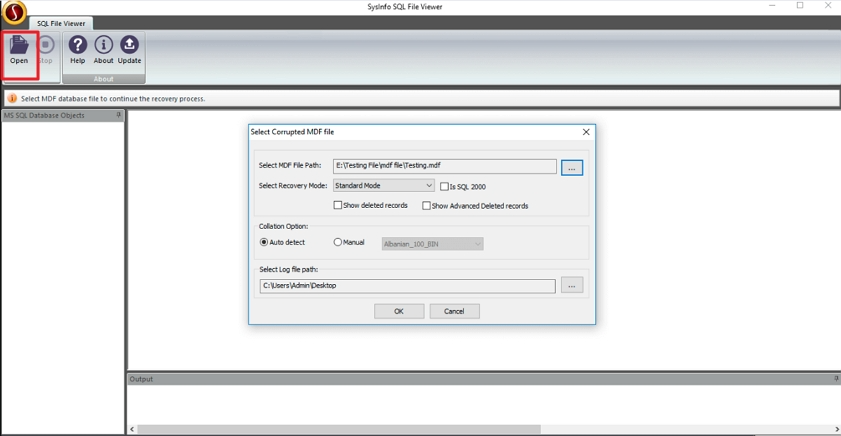
Screenshots

SQL Reader Software- Screenshots

To view full software guide, Click Here

Specs

Software Specifications

Version: 24.08
Size: 2.1 MB
Language: English
Edition: Single, Admin, Technician & Enterprise
Processor: Intel® Core™2 Duo E4600 Processor 2.40GHz
RAM: 8 GB (16 GB Recommended)
Hard Drive: 512 MB
Supported Windows: 11, 10/8.1/8/7/, 2008/2012 (32 & 64 Bit), and other Windows versions.
Comparison

Difference Between SQL Reader Free & Full Version

Get an Overview of SQL Database Reader Tool for Free & Full Version.

Features Available Demo Version Full Version
View and Read the MDF & LDF file Only Preview Save All
Offer Recovery Mode: Standard & Advanced
Works with corrupt MDF & LDF file
Save the recovered file in log or text format
Embedded with Advanced Search
Preview of MDF and LDF file
Provide Interactive GUI
24*7 Technical Assistance
Download and Purchase Download Purchase
Faq

Frequently Asked Questions

Generally asked questions and appropriate answers related to this tool.

Follow the below steps to perform this operation:

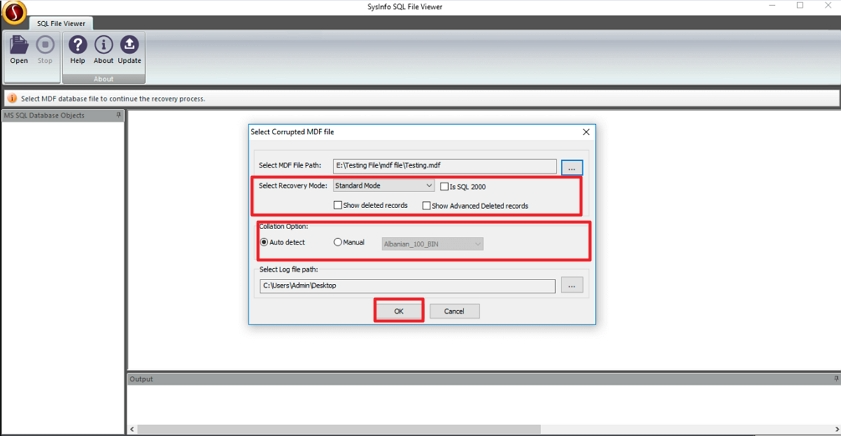
  1. Launch SQL Reader online as an administrator.
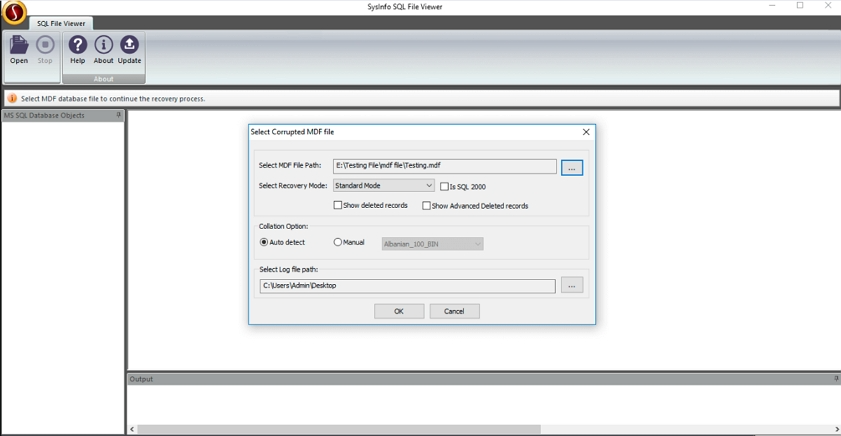
  2. Select the MS SQL files that you want to view.
  3. Choose the scanning mode according to the level of corruption.
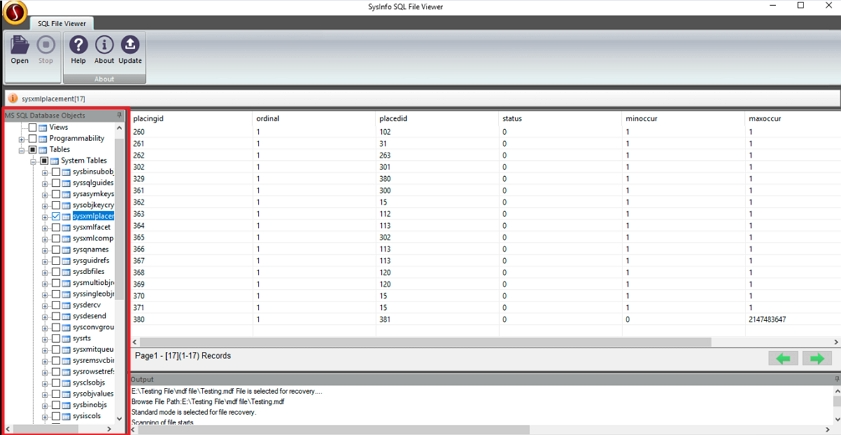
  4. Now, check the preview SQL files in the tree-structure form.
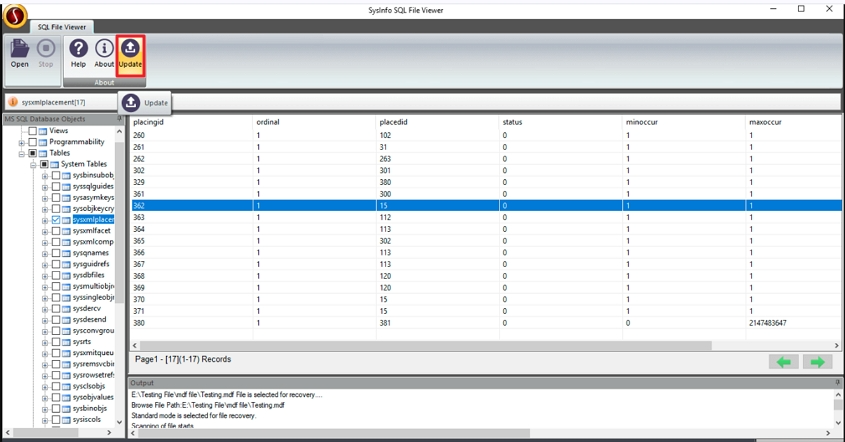
  5. Lastly, click on the Upgrade button to save the file.

No, Yes, of course! Using the MS SQL Server Reader Tool, you can easily able to read or view corrupted SQL DB files. Additionally, this tool provides two recovery modes: Standard or Advanced Mode choose one as per your needs.

SQL Reader Tool is a very helpful tool, it can be used for MDF & NDF files in the absence of an SQL Server. Also, it can be used to read data types if the SQL files are corrupted or inaccessible.

Yes, you can check out the preview of any deleted, corrupted, or inaccessible MDF and NDF files with the help of this free SQL Reader.

Free SQL viewer is designed for all SQL versions. So yes you can easily open and read SQL files of all SQL files of all versions.

Testimonials

What Clients Say about SQL Reader Software?

Verified Customer Feedback of using this tool.