Salient Features of Advanced MDF Recovery Pro Tool
Scenarios where MDF Recovery Tool download will be beneficial to users.

Advanced MDF Recovery
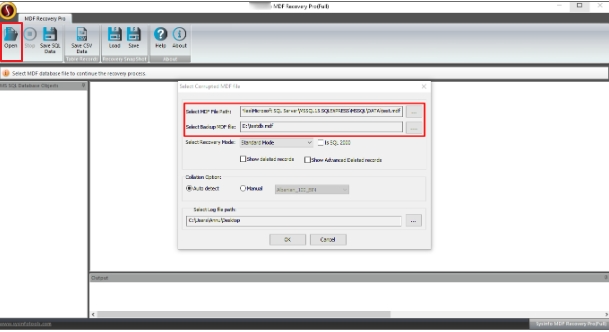
This tool scans a corrupt MDF file in just no time and recovers the maximum possible content from it. Being a non-destructive tool, it doesn’t cause any alteration to the data that it recovers from the corrupt MDF file thus, keeping the data accurate.

Performs Quick and Accurate Conversion
The Advanced SQL MDF Recovery Pro Tool can Restore MDF Files as well as NDF files of SQL Server. It works in all the scenarios of SQL database corruption like bugs, virus infection, software malfunction, sudden power or hardware failure, application crash, etc.

Use Old MDF File for Recovery
If the MDF database has lost the column information due to corruption, in this case, one should use the old MDF file. This Advanced tool loads the old MDF file and uses its schema to retrieve and recover the original column information in the MDF File.

Complete Restoration
With the help of this tool, you can successfully restore SQL database objects like tables, indices, views, programmability, keys, rules, triggers, user-defined functions, stored procedures, etc. from the corrupt MDF file within seconds easily.

Dual Recovery Mode
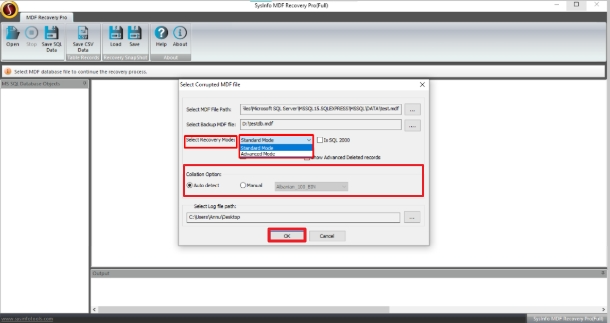
This Advanced MDF Recovery Pro Tool provides users with two modes to handle different levels of corruption. In the case of minor corruption, you should select the Standard Mode. And if corruption is severe, you should select the Advanced Mode.

Deleted Records Recovery
Prior to MDF file scanning, the tool provides the option to choose whether or not you want to recover the deleted records. You can click on the boxes “Show Deleted Records” and “Show Advanced Deleted Records” to view and recover them.

Save & Load Snapshots
There is a provision to save the snapshot of the MDF file recovery process at a user-defined location. You can Load and Save the snapshot. Also, save your time by uploading the snapshot whenever you need the MDF files again.

Smart Collation Options
By using this feature, you can define the collation type used in the MDF database. You can choose any of these two options: Auto-detect to detect the correct collation type or define it manually by selecting a specific option from the list.

MDF File Smart Preview
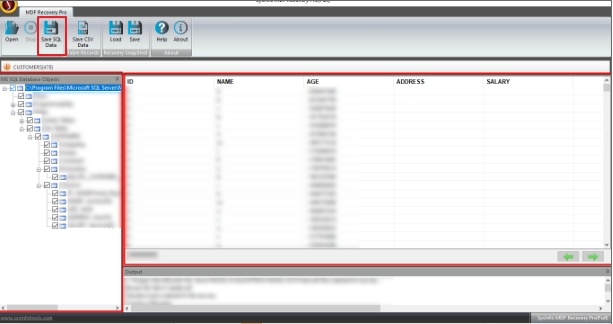
The preview feature helps you verify the recovered content with the original content. After scanning the MDF file, recovered files are displayed in a tree structure, which needs to be expanded for restoration of data.

Easy-to-use Application
MDF Recovery Pro can be used easily by a technical and non-technical person and needs no technical expertise to recover files. It contains an interactive and self-explanatory GUI that is understood by all easily.
Auto Generate Log File
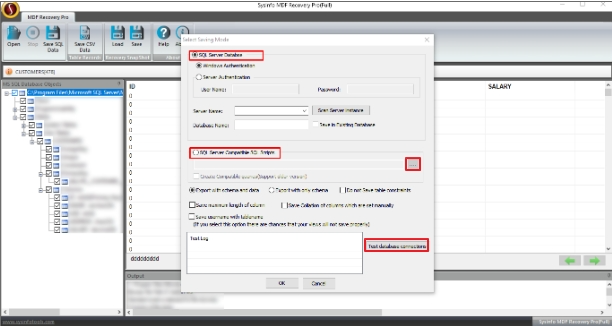
This tool allows the generation of a log file of the SQL data recovery process in the text (.txt) format. You can save it at the desired location by specifying the path or credentials for the database like username, password, port no, etc.

Windows and SQL Server Support
This tool runs perfectly with all versions of Windows OS like Windows Server 2003, 2008, 2012, XP, Vista, 7, 8, 10, and the latest 11. Also, all Microsoft SQL Server 2000, 2005, 2008, 2012, 2014, 2016, 2017 and the latest 2022.